
Direct answer
What is DeepL Write?
DeepL Write is an AI writing companion that checks spelling, grammar, and punctuation while suggesting stylistic rephrasings, word alternatives, and customized tones.
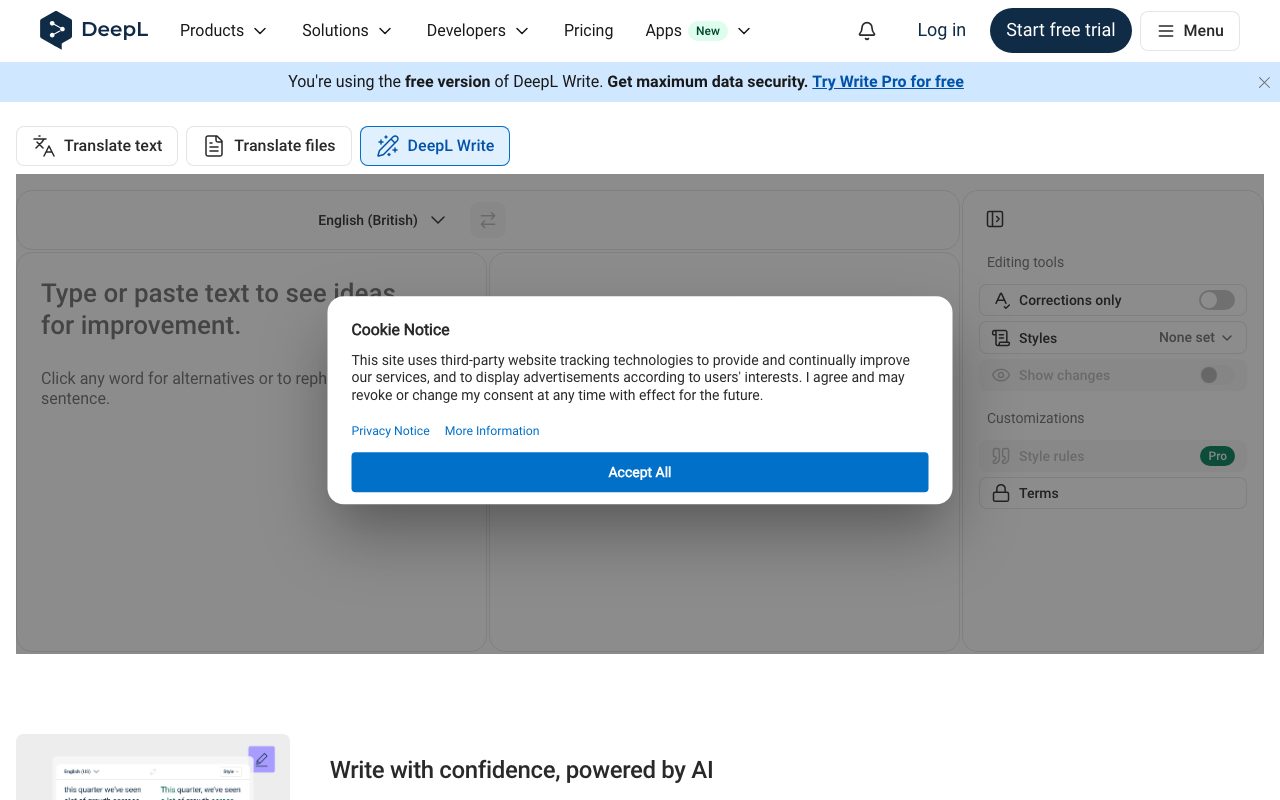
DeepL Write functions as an AI-driven editing and writing assistant designed to help professionals sound natural, fluent, and precise. Users can type or paste text directly into the web toolbar to identify grammar, spelling, and punctuation errors instantly. Beyond basic mechanics, the tool provides contextual paraphrasing. Writers can click on any individual word to explore alternative phrasing or rework entire sentences to match specific contexts. It features an interface with editing controls like 'Corrections only', 'Styles', and 'Show changes' to give users granular visibility into suggested edits. For business workflows, DeepL Write connects to broader enterprise features including customizable style rules and Pro terms. Users can apply the assistant across multiple environments via browser extensions, desktop applications, mobile apps, and direct integrations with Microsoft Office and Google Workspace.
DeepL Write combines DeepL's language AI with interactive editing controls, letting users switch between strict grammatical corrections, customized tone styles, and interactive word-by-word alternative suggestions.
Product capabilities
Key features
Grammar and Punctuation Correction
Detects and corrects spelling errors, grammatical mistakes, and punctuation issues to ensure error-free text.
Word and Sentence Alternatives
Allows users to click any word to view alternative vocabulary options or rephrase complete sentences.
Style and Tone Adjustment
Enables writers to choose distinct writing styles and tones tailored to specific audiences.
Show Changes and Editing Modes
Provides dedicated toggle options such as 'Corrections only' and 'Show changes' to inspect modifications clearly.
Customization with Style Rules and Pro Terms
Supports organizational terminology and customized style rules for enterprise consistency under Pro features.
Practical fit
Who should use DeepL Write?
Polishing Business Communications
Refining emails, reports, and memos to sound clear, professional, and grammatically precise.
Non-Native Language Writing
Helping non-native speakers draft fluent, idiomatic copy with contextual sentence improvements.
Quick Proofreading and Rewriting
Pasting draft sections into the toolbar to compare rephrased options and eliminate repetitive phrasing.
Editorial assessment
Pros and limitations
Where it is strong
- Clean dual-pane interface with immediate suggestions
- Interactive word-level and sentence-level replacement suggestions
- Dedicated controls for showing diffs and restricting suggestions to corrections only
- Available across browser extensions, desktop apps, and office suites
Where to be careful
- Not built for open-ended generative writing from prompts
- Detailed tier pricing and feature gates require visiting the external pricing table
Commercial context
DeepL Write pricing
At the review date of 2026-09-08, DeepL offers free web access alongside paid DeepL Pro plans with a 30-day free trial; specific numeric pricing tiers are not detailed on the supplied pages and should be verified on the official website.
Pricing, limits, taxes, model access, and regional availability can change. Verify the purchase-critical details on the official pricing page linked under Sources.
Transparent ranking
Why DeepL Write scores 76.7
Each factor is scored on a 100-point scale, then combined using the public ToolsRank weights. Engagement and momentum stay at a neutral baseline until measured signals exist, so no tool can gain or lose position from numbers nobody recorded.
Compatibility
Languages, platforms, and integrations
Languages
- English
- German
Integrations & surfaces
- Microsoft Word
- Microsoft Outlook
- Microsoft PowerPoint
- Google Workspace
- Microsoft 365
- Chrome
- Firefox
- Edge
Community
Reviews and questions
No approved member reviews yet. Editorial factors above are the only rating on this page.
Reviews and questions come from Google-signed members and are checked by an editor before they appear.
Frequently asked
DeepL Write FAQ
What is DeepL Write?+
DeepL Write is an AI-powered writing companion that detects spelling, grammar, and punctuation mistakes while suggesting alternative words and sentence structures to improve tone and clarity.
Can I use DeepL Write for free?+
Yes, DeepL Write provides a free web interface where users can type or paste text to receive improvement suggestions, alongside paid DeepL Pro subscriptions that unlock advanced features.
How do I choose alternative words or rephrase a sentence?+
In the DeepL Write interface, you can click on any individual word in the improved result to view a list of alternative synonyms or rephrase the entire sentence.
What integrations and apps are available for DeepL?+
DeepL offers desktop apps for Mac and Windows, mobile apps for iOS and Android, extensions for Chrome, Firefox, and Edge, and integrations with Microsoft Word, Outlook, PowerPoint, and Google Workspace.
