Direct answer
What is Hemingway Editor?
Hemingway Editor is a focused writing environment that uses colour-coded highlights to identify dense sentences, passive voice, adverbs, and complex phrasing to improve clarity.
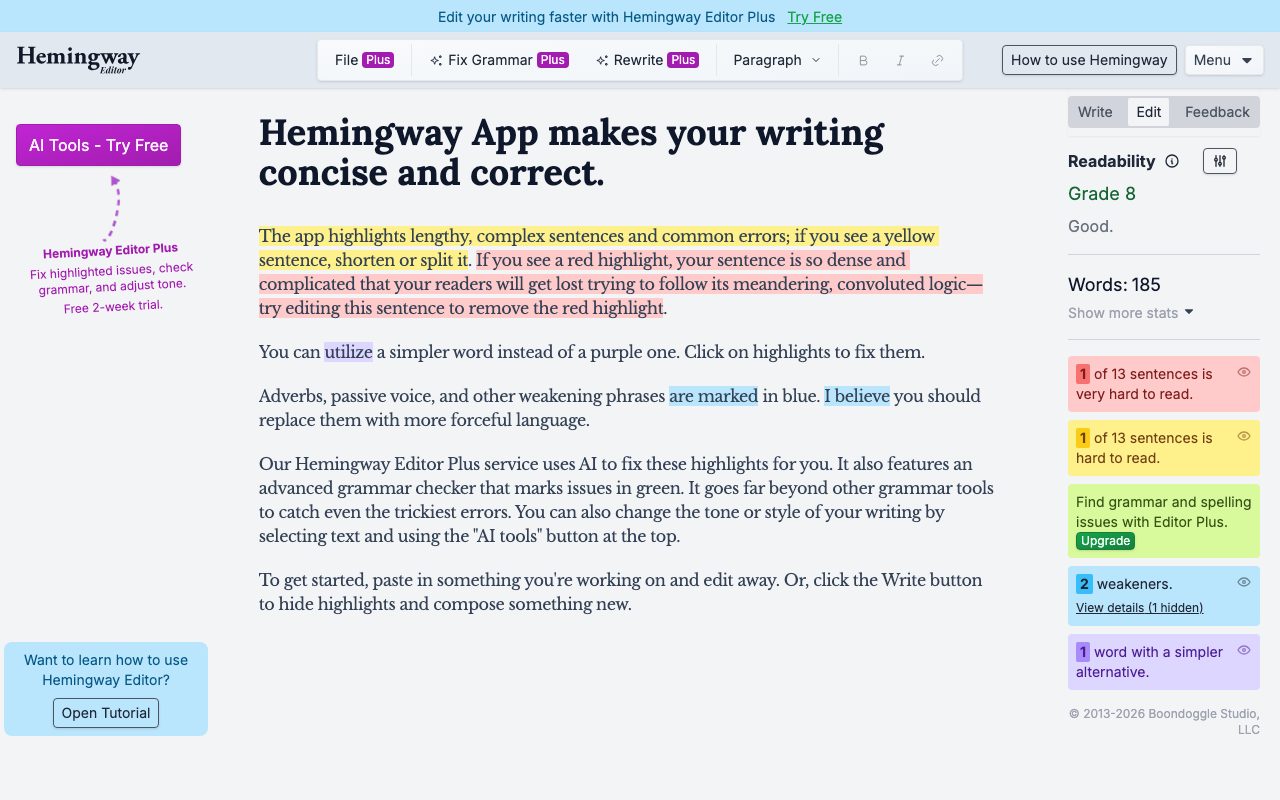
Hemingway Editor is a writing and editing tool developed by Boondoggle Studio that focuses on making text concise, punchy, and readable. Originally known for its distraction-free interface and colour-coded clarity diagnostics, the platform analyzes text against readability metrics like reading grade level and sentence structure. The core editor color-codes text to indicate specific stylistic issues: yellow signals lengthy sentences that should be split, red flags dense or meandering sentences, purple suggests simpler synonyms for complex words, and blue highlights adverbs, passive voice, and weakening phrases. Users can toggle between a distraction-free 'Write' mode and a diagnostic 'Edit' mode to revise drafts without interruption. With the introduction of Hemingway Editor Plus, the platform adds AI-driven revision tools. The Plus edition features an advanced grammar checker that flags errors in green, automated one-click suggestions to resolve highlighted readability issues, and options to rewrite phrases or adjust tone. Boondoggle Studio also offers standalone free utilities including a grammar checker, paraphrasing tool, AI proofreader, and readability calculator.
Unlike standard spellcheckers that focus primarily on mechanical typos, Hemingway emphasizes sentence-level clarity and readability through immediate, color-coded visual cues that train writers to trim fluff and simplify syntax.
Product capabilities
Key features
Color-Coded Readability Highlights
Identifies hard-to-read sentences in yellow, very complex sentences in red, simpler word suggestions in purple, and weakening phrases or passive voice in blue.
Hemingway Editor Plus AI Revisions
Uses artificial intelligence to automatically resolve highlighted issues, rewrite sentences, and change stylistic tone.
Advanced Grammar Checker
Available in the Plus edition, this checker highlights grammatical and spelling errors in green to catch subtle errors.
Readability Grade Scoring
Calculates an automated reading grade level alongside word count and sentence complexity metrics.
Distraction-Free Modes
Allows writers to switch between an 'Edit' mode with active diagnostic highlights and a clean 'Write' mode that hides all feedback during composition.
Free Browser Utilities
Provides dedicated standalone web tools for paraphrasing, grammar checking, proofreading, and readability scoring.
Practical fit
Who should use Hemingway Editor?
Trimming Verbose Drafts
Pasting blog posts, essays, or marketing copy into the editor to spot and break down overly complex sentences.
Eliminating Passive Voice
Locating blue highlights to swap passive constructions and weak qualifiers for direct, active verbs.
Audience Readability Targeting
Monitoring the automated grade-level score to ensure content remains accessible for general web readers.
AI-Assisted Rewriting
Selecting problematic text in Hemingway Editor Plus to instantly rephrase or adjust tone with AI suggestions.
Editorial assessment
Pros and limitations
Where it is strong
- Instant, intuitive color-coded feedback on writing complexity and style
- Generous core editing experience accessible directly in the browser without an account
- 14-day free trial for Hemingway Editor Plus without requiring credit card details
- Clean toggle between drafting in Write mode and reviewing in Edit mode
Where to be careful
- Specific monthly or annual subscription pricing for Plus is not transparently listed on the homepage
- Web editor lacks deep native cloud document management and multi-user collaboration
Commercial context
Hemingway Editor pricing
At the review date, Hemingway Editor offers a free browser-based editor alongside free standalone writing tools. Hemingway Editor Plus includes an AI-assisted grammar checker and tone tools with a 14-day free trial (no credit card required); exact subscription tier pricing is not published on the front page and should be verified on the vendor's site.
Pricing, limits, taxes, model access, and regional availability can change. Verify the purchase-critical details on the official pricing page linked under Sources.
Transparent ranking
Why Hemingway Editor scores 72.9
Each factor is scored on a 100-point scale, then combined using the public ToolsRank weights. Engagement and momentum stay at a neutral baseline until measured signals exist, so no tool can gain or lose position from numbers nobody recorded.
Compatibility
Languages, platforms, and integrations
Languages
- English
Integrations & surfaces
- Web browser
Community
Reviews and questions
No approved member reviews yet. Editorial factors above are the only rating on this page.
Reviews and questions come from Google-signed members and are checked by an editor before they appear.
Frequently asked
Hemingway Editor FAQ
What do the different highlight colors mean in Hemingway Editor?+
Yellow highlights indicate sentences that are long or hard to read. Red highlights denote dense, very complicated sentences that should be shortened. Purple highlights suggest simpler vocabulary choices. Blue marks adverbs, passive voice, and weak language. Green highlights (available with Hemingway Editor Plus) flag grammar and spelling errors.
Is Hemingway Editor free to use?+
Yes, the standard web-based Hemingway Editor and its standalone readability and paraphrasing tools are free to access in a browser. Hemingway Editor Plus, which adds AI rewriting and an advanced grammar checker, includes a 14-day free trial that requires no credit card.
What is the difference between Write and Edit modes?+
Write mode hides all highlights and diagnostic panels so you can compose without distraction. Edit mode displays sentence metrics, the readability grade score, and all color-coded highlights to facilitate revision.
Who develops Hemingway Editor?+
Hemingway Editor and Hemingway Editor Plus are developed and maintained by Boondoggle Studio, LLC.