Direct answer
What is Lexica?
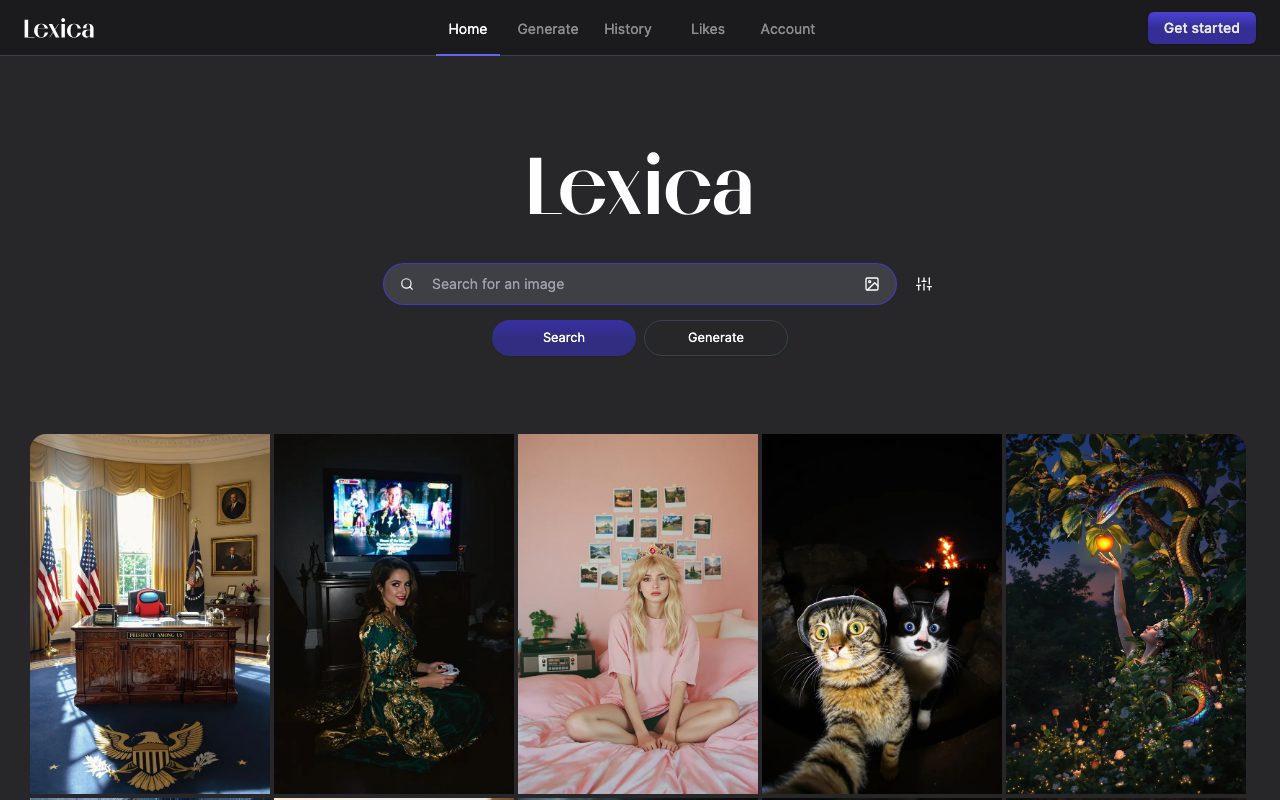
Lexica is a web-based AI image generation platform and creative gallery featuring searchable visual prompts, history tracking, and personal collections.
Lexica serves as an AI image creation interface paired with an extensive visual search repository. Visitors can explore a public library of generated images alongside the exact text prompts used to produce them—spanning analog film simulations, digital artwork, stylized characters, and pop-culture mashups. The application provides dedicated navigation for searching existing prompt styles, generating new imagery directly in the browser, tracking generation history, and favoriting prompts or outputs via a Likes collection. While the homepage showcases diverse outputs and prompt syntax, detailed model specifications, compute limits, and pricing terms are accessed after opening an account.
Lexica combines an active image generation engine with a public search directory of completed prompts and images, allowing creators to inspect prompt syntax and visual outputs side by side before creating their own.
Product capabilities
Key features
Searchable prompt gallery
Enables users to search a vast catalog of AI-generated images and review the detailed text prompts used to create them.
Direct image generation
Offers an integrated generation interface allowing users to write descriptive text prompts and produce synthetic images.
Generation history
Provides a dedicated history log where signed-in users can review previously rendered prompts and outputs.
Likes collection
Allows users to bookmark preferred images and prompt recipes to a personal favorites section for later reference.
Account management
Includes standard account onboarding via a Get Started workflow to manage personal assets and settings.
Practical fit
Who should use Lexica?
Prompt inspiration and reverse-engineering
Reviewing existing prompt formulations—such as specific camera lenses, lighting styles, and artistic genres—to refine personal generation prompts.
Concept art prototyping
Generating stylized visuals, character ideas, and artistic scenes for early-stage design boards and storytelling projects.
Visual moodboard assembly
Browsing and saving favorited artworks to build visual references for creative briefs and branding assignments.
Editorial assessment
Pros and limitations
Where it is strong
- Clean interface that emphasizes immediate visual exploration
- Direct visibility into full prompt text for public images in the directory
- Dedicated history and bookmarking features for tracking past creations
Where to be careful
- Homepage does not provide visible pricing tables, subscription levels, or credit allowances
- No public documentation on specific model versions or generation parameter adjustments on the landing page
Commercial context
Lexica pricing
As of September 2026, the official homepage does not publish plan tiers, pricing rates, or credit quotas. Visitors can register via the Get Started button, but current commercial and subscription terms must be verified directly on lexica.art.
Pricing, limits, taxes, model access, and regional availability can change. Verify the purchase-critical details on the official pricing page linked under Sources.
Transparent ranking
Why Lexica scores 60.7
Each factor is scored on a 100-point scale, then combined using the public ToolsRank weights. Engagement and momentum stay at a neutral baseline until measured signals exist, so no tool can gain or lose position from numbers nobody recorded.
Compatibility
Languages, platforms, and integrations
Languages
- English
Integrations & surfaces
- Web browser
Community
Reviews and questions
No approved member reviews yet. Editorial factors above are the only rating on this page.
Reviews and questions come from Google-signed members and are checked by an editor before they appear.
Frequently asked
Lexica FAQ
What is Lexica used for?+
Lexica is used for searching AI-generated art and prompts, as well as generating new images from text descriptions through its web interface.
Can you see the prompts used to generate images on Lexica?+
Yes. The search and gallery interface presents generated images alongside the descriptive text prompts used to produce them.
Does Lexica require an account?+
The platform displays a Get Started and Account section in its main navigation. An account is required to generate images, track history, and save liked artwork.
How much does Lexica cost?+
Specific plan prices, tiers, and generation limits are not published on the main homepage. Visitors must sign up or check account billing options on the official site to see current pricing.