Direct answer
What is Spline?
Spline couples generative text-to-3D and image-to-3D tools with a real-time collaborative 3D scene editor, letting creators generate, refine, animate, and export interactive assets directly in the browser.
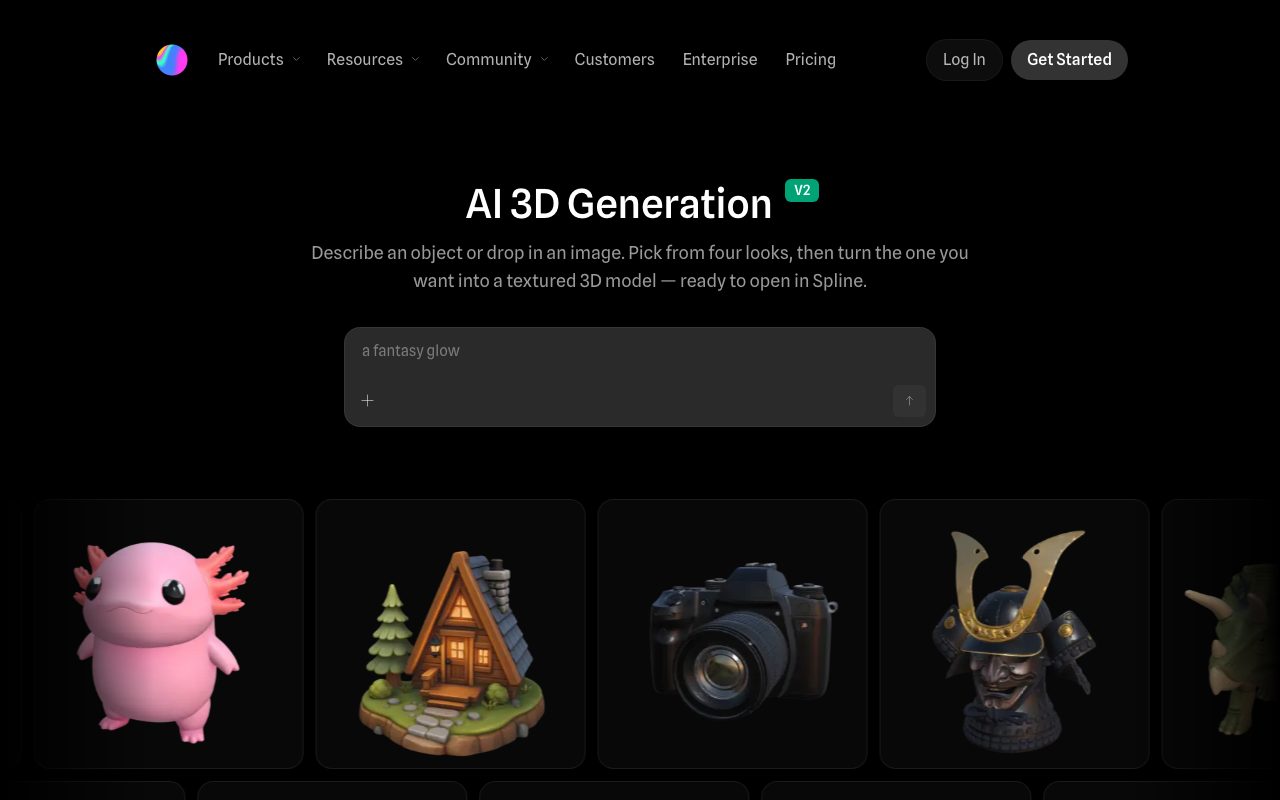
Spline is an interactive 3D design environment that runs in web browsers and native desktop apps. Through its AI 3D Generation V2 engine, users can produce textured 3D meshes either by typing descriptive prompts or uploading reference sketches and photographs up to 15MB. The generator outputs four distinct concept variants in seconds, enabling users to choose a preferred look and convert it into a complete mesh with base color, metallic-roughness, and normal PBR maps. Generated models can be inspected directly in the viewport using multiple render modes, including shaded, clay, and wireframe views, alongside real-time polygon, vertex, and file size metrics. Users can preview their objects under four distinct lighting rigs and turntable rotation before committing them to the scene. Once generated, models move seamlessly into Spline's native editing workspace where designers can add animations, custom lighting, procedural materials, physics, interactivity, variables, and API triggers. For deployment, the platform supports direct web embeds without watermarks on paid plans, alongside native mobile exports into Swift code or Xcode projects for Apple devices, and Kotlin code, APKs, or AABs for Android. Advanced 3D export formats including GLB, GLTF with color and texture, USDZ, and STL are also provided on higher subscription tiers.
Unlike standalone AI mesh generators that deliver disconnected raw meshes, Spline integrates AI text-and-image generation directly into a collaborative 3D scene builder with native PBR viewport inspection, web embeds, and iOS/Android code export.
Product capabilities
Key features
Text to 3D Generation
Transforms descriptive natural-language prompts into four visual variants in seconds, allowing creators to mesh their preferred visual directly into a textured 3D object.
Image to 3D Generation
Accepts uploaded photos, concept art, sketches, or screenshots up to 15MB and reconstructs them into 3D meshes with depth and volume.
SOTA Model Comparison
Enables users to evaluate and switch between different state-of-the-art AI 3D generation models to achieve the look that matches their project requirements.
PBR Material Maps
Automatically applies realistic physically based rendering maps to meshes, including base color, metallic-roughness, and normal maps.
Inspection Rendering Modes
Provides viewport toggles for shaded, clay, and wireframe views, plus individual map inspections to evaluate surface geometry and texturing.
Scene Lighting and Turntable Controls
Features four preset lighting rigs with adjustment dials for ambient light, exposure, light strength, and rotation alongside an animated turntable preview.
Interactive Multi-Platform Publishing
Generates embeddable web code snippets, Swift code snippets or Xcode projects for Apple platforms, and Kotlin code snippets, APKs, or AABs for Android.
Model Statistics Viewport
Displays live polygon face counts, vertex counts, overall file sizes, and texture map payloads on the viewport before committing the model.
Workflow
How Spline works
- Enter a descriptive prompt or upload an image up to 15MB to generate 3D concepts.
- Evaluate the four generated preview cards and select the preferred concept.
- Mesh the selected visual to construct a 3D asset complete with base color, metallic-roughness, and normal maps.
- Inspect the mesh in shaded, clay, or wireframe rendering modes under different lighting rigs.
- Open the generated model inside Spline's interactive editor to apply lighting, interactions, or variables, then export to Web, iOS, Android, or standard 3D formats.
Practical fit
Who should use Spline?
Interactive Web Design Elements
Generating 3D hero assets or brand mascots and embedding them directly into websites with interaction triggers and code snippets.
Rapid Game Asset Prototyping
Drafting low-to-mid poly props, vehicles, or stylized characters from reference sketches to validate scene layout before finalizing assets.
Mobile App 3D Visuals
Exporting native interactive 3D components into Swift/Xcode for iOS or Kotlin/APK for Android apps.
3D Concepting from 2D Artwork
Converting concept sketches and mockups into three-dimensional volumes to check proportions and materials in real-time.
Editorial assessment
Pros and limitations
Where it is strong
- Integrated workflow allows seamless transition from prompt to full 3D interactive scene editing
- Automates generation of real PBR maps including base color, roughness-metallic, and normal textures
- Offers clear geometric metrics such as face count, vertex count, and file size before importing
- Exports production-ready code snippets and packages for Web, Apple platforms, and Android
- Includes viewport inspection across shaded, wireframe, and clay rendering modes
Where to be careful
- AI 3D generation usage consumes monthly credits, requiring paid plans or credit add-ons for heavy volume
- Free plan exports include watermarks and have personal file restrictions
- Advanced 3D exports like USDZ and STL require a paid Pro tier or higher
Commercial context
Spline pricing
At the review date (September 2026), Spline provides a free tier alongside paid plans starting at $12 per month billed annually ($15 monthly) for Hobby, $25 per month billed annually ($30 monthly) for Pro, and $60 per month billed annually ($70 monthly) for Max. Each paid tier includes monthly AI credit allowances. Check the official pricing page for up-to-date credit limits and export restrictions.
| Plan | Price | What it includes |
|---|---|---|
| Free | $0 / month |
Suitable for exploring the editor with watermarked web output. |
| Hobby | $12 / month |
$12/month billed annually ($144/year) or $15 billed monthly. |
| Pro | $25 / month |
$25/month billed annually ($300/year) or $30 billed monthly. |
| Max | $60 / month |
$60/month billed annually ($720/year) or $70 billed monthly. |
| Enterprise | Custom / year |
Billed annually upon contacting sales. |
Pricing, limits, taxes, model access, and regional availability can change. Verify the purchase-critical details on the official pricing page linked under Sources.
Transparent ranking
Why Spline scores 78.9
Each factor is scored on a 100-point scale, then combined using the public ToolsRank weights. Engagement and momentum stay at a neutral baseline until measured signals exist, so no tool can gain or lose position from numbers nobody recorded.
Compatibility
Languages, platforms, and integrations
Languages
- English
Platforms
- Web
- macOS / iOS (Apple Platforms)
- Android
Integrations & surfaces
- Web (HTML/JS Embeds)
- Apple Platforms (Swift & Xcode)
- Android (Kotlin, APK & AAB)
- GLTF / GLB
- USDZ
- STL
Community
Reviews and questions
No approved member reviews yet. Editorial factors above are the only rating on this page.
Reviews and questions come from Google-signed members and are checked by an editor before they appear.
Frequently asked
Spline FAQ
Can I use Spline AI for free?+
Spline offers a Free plan ($0/month) that permits basic 3D editing and personal files, but web exports include watermarks. Paid tiers such as Hobby, Pro, and Max include dedicated monthly AI credit quotas to power AI 3D generation features.
What export formats are available for generated 3D models?+
Models can be exported as standard GLB files, GLTF with color and texture, USDZ, STL, or directly as embeddable web code, Apple Swift/Xcode projects, and Android Kotlin/APK packages depending on your subscription tier.
What inputs does Spline AI 3D Generation accept?+
The generator accepts text prompts describing an object, or 2D image uploads including photos, sketches, and screenshots up to 15MB in file size.
How are monthly AI generation credits allocated?+
Monthly plans include base credit allotments: Hobby provides 2,000 credits/month, Pro includes 3,000 credits/month, and Max comes with 10,000 credits/month. Users can also purchase credit add-on tiers if they need more capacity.
What security standards does Spline comply with?+
Spline is ISO 27001 certified, holds SOC 2 Type 1 and Type 2 certifications, adheres to GDPR requirements, uses AWS cloud hosting in the United States, and offers SAML SSO on Enterprise plans.