Direct answer
What is Mindgrasp?
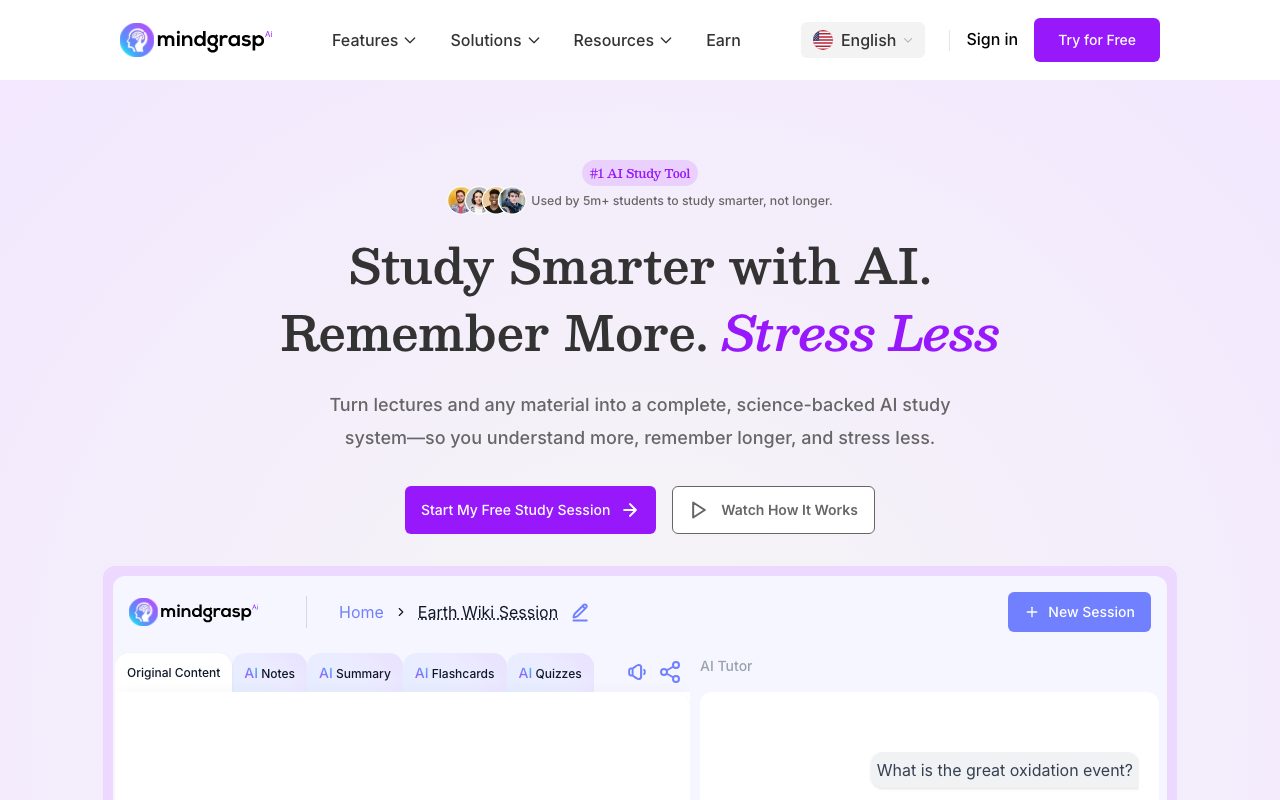
Mindgrasp transforms lectures, videos, audio, and documents into comprehensive study sessions featuring auto-generated notes, summaries, active recall flashcards, practice quizzes, and an interactive AI tutor.
Mindgrasp is an AI-powered study platform designed to streamline learning and study preparation from a wide variety of source materials. Users can upload documents including PDFs, Word documents (DOCX), and presentations (PPT), input links from web articles, YouTube, or Vimeo, or upload and record live audio and video (MP3, MP4). From this input, Mindgrasp builds a structured study session that automatically produces organized notes, concise topic summaries, active recall flashcards, and comprehension quizzes. In addition to static materials, each session includes an interactive 24/7 AI Tutor that answers questions and explains difficult concepts grounded in the uploaded material. The platform also provides session-level progress tracking with checklists so learners can monitor their review status. Mindgrasp is accessible across devices via a web application, an iOS mobile app, and a Google Chrome extension that allows students to pull content directly from web pages and learning management systems such as Canvas and Blackboard.
Unlike generic text summarizers, Mindgrasp automatically synthesizes diverse media—including live lecture audio, video links, and lecture slides—into a complete learning kit with flashcards, self-testing quizzes, and a contextual AI tutor with no daily usage limits on its plans.
Product capabilities
Key features
AI Notes Generator
Automatically extracts and organizes key information from uploaded documents, live recordings, and videos into structured notes.
Active Recall Flashcards
Generates flashcards from course material to support active recall study methods and long-term memory retention.
AI Practice Quizzes
Formulates self-assessment quizzes directly from uploaded content to help learners identify gaps before examinations.
AI Summarization
Condenses lengthy textbook chapters, research papers, lecture recordings, and video links into quick, scannable summaries.
24/7 AI Tutor
Provides an on-demand chat tutor grounded in session materials to answer questions and clarify difficult concepts.
Multi-Format Content Ingestion
Supports live audio recording alongside file uploads of PDFs, DOCX, PPT, MP3, MP4, YouTube URLs, Vimeo links, and web articles.
Study Progress Tracking
Tracks session checklists and real-time completion status across notes, summaries, flashcards, and quizzes.
Workflow
How Mindgrasp works
- Create a dedicated study session for a specific lecture, chapter, or exam topic.
- Record live lecture audio or upload files such as PDFs, slides, MP3s, MP4s, or web/video links.
- Mindgrasp processes the input and automatically outputs structured notes, a summary, active recall flashcards, and quizzes.
- Review notes, take generated quizzes, test memory using flashcards, and ask the 24/7 AI Tutor to clarify difficult points.
Practical fit
Who should use Mindgrasp?
Lecture Capture and Transcription
Recording in-person or virtual lectures to generate clear notes, summaries, and revision flashcards automatically.
Exam Preparation
Converting textbook chapters, slide decks, and readings into practice quizzes and active recall flashcards.
Teaching Material Generation
Enabling educators to quickly produce quizzes, summaries, and study guides from video modules and class readings.
Editorial assessment
Pros and limitations
Where it is strong
- Supports a wide array of formats including live audio recordings, video links, PDFs, and slide decks.
- Combines notes, summaries, flashcards, quizzes, and a conversational AI tutor in each session.
- Offers a Chrome extension for capturing material from platforms like Canvas and Blackboard.
- Plans come with unlimited uploads and no daily usage caps according to the vendor.
Where to be careful
- Specific subscription tier pricing and terms are not transparently detailed on the public landing page.
- Mobile access is highlighted for iOS, but dedicated Android app details are not listed on the official homepage.
Commercial context
Mindgrasp pricing
At the review date of 2026-09-08, Mindgrasp provides free initial study sessions and free web utilities, alongside paid subscription plans featuring unlimited uploads and no daily limits. Specific plan tiers and pricing figures are not disclosed on the homepage or privacy policy and should be verified on the official website.
Pricing, limits, taxes, model access, and regional availability can change. Verify the purchase-critical details on the official pricing page linked under Sources.
Transparent ranking
Why Mindgrasp scores 72.3
Each factor is scored on a 100-point scale, then combined using the public ToolsRank weights. Engagement and momentum stay at a neutral baseline until measured signals exist, so no tool can gain or lose position from numbers nobody recorded.
Compatibility
Languages, platforms, and integrations
Languages
- English
Platforms
- Web
- iOS
- Google Chrome Extension
Integrations & surfaces
- Canvas
- Blackboard
- YouTube
- Vimeo
- Google Chrome
Community
Reviews and questions
No approved member reviews yet. Editorial factors above are the only rating on this page.
Reviews and questions come from Google-signed members and are checked by an editor before they appear.
Frequently asked
Mindgrasp FAQ
What file types and links does Mindgrasp accept?+
Mindgrasp accepts PDFs, DOCX documents, PowerPoints (PPT), MP3 audio files, MP4 video files, online article links, YouTube video links, and Vimeo links. Users can also record live audio directly within the platform.
Are there daily usage limits on Mindgrasp plans?+
According to the vendor FAQ, all of Mindgrasp's plans include unlimited uploads and have no daily limits on usage.
How does Mindgrasp differ from general AI chatbots?+
Mindgrasp is built specifically for studying and productivity. Rather than requiring prompt engineering, it ingests multi-format documents and media to automatically generate structured notes, active recall flashcards, practice quizzes, and an AI tutor grounded in the source material.
What platforms and devices does Mindgrasp support?+
Mindgrasp can be accessed via web browsers, an iOS mobile application, and a Google Chrome extension that integrates with web content and learning management systems like Canvas and Blackboard.